Everything important documented.Without writing it yourself.
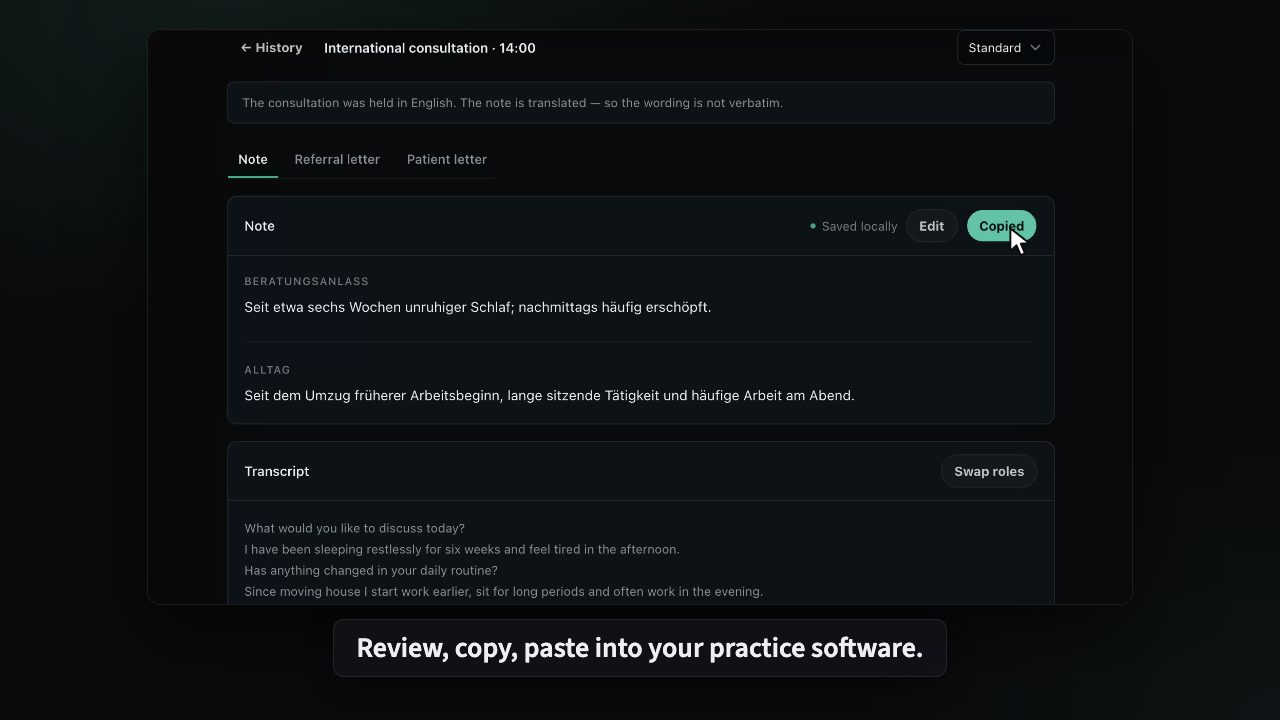
KiPT Voice turns your consultation into concise, structured documentation. See which symptoms and treatment decisions were discussed when you return to the record. You review the draft and copy it into your practice software.
From €49.99 per physician per month including 19% VAT. Twelve-month term, billed monthly.
For Windows 11 · 14 days free · No credit card · No automatic subscription
- The recording stays on the practice computer
- AI locally on your computer, or through our AI provider based in the EU
- No login required. Patient data stored locally
You lead the conversation. KiPT Voice documents it.
Built in daily exchange with physicians who already use AI in their consultations.
KiPT Voice
Everything important documented, without writing it yourself. KiPT Voice structures discussed symptoms, treatment reasons and actions into a concise draft. You review it and copy it into your practice software.
The recording never leaves your practice
A cloud service has to upload a conversation before it can delete it. KiPT Voice never uploads it: recording and speech recognition run on your practice computer.
On your practice computer
Recording and speech recognition run locally.
The audio is stored encrypted on disk and is never transmitted.
With a local model, the text stays in the practice too
With a local model, speaker attribution, draft generation and transcript text stay in the practice.
If you use an AI provider based in the EU instead, it receives the transcript text and nothing else, for speaker roles and the note.
Structured and ready for your practice software
A structured draft based on your template appears on the practice computer, ready to review and copy into your practice software.
AI does the writing, you keep the final word and have time for what matters.
Our servers store no audio, no transcript and no note.
Trying it costs you nothing
14 days free, no credit card. Do nothing and the trial simply ends.
After that from €49.99 per physician per month, including 19% VAT.
Easier than you think
- Install the app
- Set it up step by step
- Ready in 10 minutes
No IT knowledge needed. If a question comes up, we answer personally.
Your attention belongs to your patient
Whoever takes notes listens less. Whoever listens writes up later from memory.
That is why we built KiPT Voice: you listen, AI writes the draft. The recording stays in your practice.
You read, correct and decide. KiPT Voice makes no diagnoses and assesses nothing. We draw that line on purpose.
J Medical GmbH developed KiPT Voice together with Dr. med. Jonida Gjolli and tested it in everyday use at her Berlin practice, Praxis Jona.
- Made in Germany
- Works with local AI models
- AI provider based in the EU
- GDPR compliant
KI Praxis Tools is a product of J Medical GmbH, based in Berlin. Legal notice
Knowledge for practices
The questions that come before you start, answered: recording, consent, data paths, software selection. Published in German.
AI in the medical practice 2026: what works today, what the legal position is, and what practices should check before use
An overview for practices: where AI already helps in daily practice work today, what rules apply to recording, data protection, and documentation, and what to check before a pilot.
Read more
AI documentation for medical practices: 14 providers at a glance, by their own claims
14 providers of AI documentation for medical practices in one table: where audio and text are processed, platform, PMS integration, languages, and list prices.
Read more AI-generated illustration
Recording a doctor's appointment: what is permitted and how consent works in the consultation
Is it allowed to record a doctor's appointment? What § 201 StGB requires, how the practice obtains and documents consent, and what applies if it is declined.
Read moreFrequently asked questions
Which tools exist today?
Two. KiPT Voice, available now to every practice in Germany: the first 14 days are free, then you choose a plan. And KiPT GOÄ, the reference to the German physicians' fee schedule: free, no sign-up, and it stays that way.
What does KiPT Voice cost?
Nothing for the first 14 days, no credit card. Then €49.99 per physician per month on a twelve-month term or €59.99 month to month, both including 19% VAT, and only once you have explicitly chosen a plan. You choose the number of physicians at checkout.
What leaves the practice computer?
The audio recording never does. The selected provider can receive transcript text for speaker roles and the draft. With a local model, the text stays on the computer too.
Does it work with my practice software?
With any of them. KiPT Voice creates a text draft that you review and paste into your practice software. There is no direct integration and no automatic transfer, on purpose.
How do I start?
Download KiPT Voice for Windows 11. After installation, choose “Try for free” and order the free trial with your email address. Enter the licence key shown after ordering in the application. Try it for 14 days, without a credit card or automatic subscription. No appointment required.
What don't the tools do?
They do not assess or interpret what was said. They structure what was said; the professional judgment stays entirely with you.
Know what was discussed at the next appointment.
Download KiPT Voice for Windows 11 and install it. Start your free trial in the application and get your licence key straight away. No credit card, appointment or personal call required.
Or write directly to
Do not send patient information. A personal response, no newsletter, no sales call.